Every factory faces the same question: how do you get sensor data from the shop floor to the systems that need it? The answer is never one protocol. It’s two — MQTT for vertical data flow to IT systems, and OPC UA for horizontal integration with SCADA and HMI on the plant floor.
Industrial edge gateways from Siemens, Beckhoff, and Softing implement exactly this pattern. They cost $1,000–$5,000. A Raspberry Pi 4 with a BME280 sensor does the same thing for $41.
This post isn’t a tutorial — it’s a visual breakdown of the edge gateway architecture, built on real hardware, showing why these two protocols complement each other rather than compete.
The Edge Gateway Pattern #
An edge gateway sits at the boundary between OT (sensors, PLCs, actuators) and IT (cloud, dashboards, ERP). But it’s important to understand what it is not.
SCADA is the operational backbone of the plant floor. It monitors and controls the process — alarms, trending, historian, operator displays. These are mission-critical. If SCADA goes down, operations stop.
An edge gateway doesn’t control anything. It reads data from the OT side — PLCs, sensors, even SCADA itself — and makes it available to systems that SCADA was never designed to talk to: cloud analytics, AI/ML pipelines, ERP, enterprise dashboards. If the edge gateway goes down, operations continue unaffected.
This separation is deliberate. You don’t want cloud connectivity or analytics pipelines running on the same system responsible for process alarms and safety-critical displays. The edge gateway extends SCADA’s reach without touching its responsibility.
flowchart BT
    subgraph "Level 0-1: Field Devices"
        SENSOR[BME280
Temperature / Humidity / Pressure]
    end

    subgraph "Level 2: Edge Gateway"
        READER[Sensor Reader
Python + I2C]
        OPCUA[OPC UA Server
Port 4840]
        MQTT[MQTT Publisher
+ Mosquitto Broker]
    end

    subgraph "Level 3: Site Operations"
        SCADA[SCADA / HMI
OPC UA Client]
    end

    subgraph "Level 4: Enterprise / Cloud"
        DASH[Dashboards
Grafana / Node-RED]
        CLOUD[Cloud Analytics
AWS IoT / Azure]
    end

    SENSOR -->|I2C Bus| READER
    READER --> OPCUA
    READER --> MQTT
    OPCUA <-->|Request/Response
LAN| SCADA
    MQTT -->|Publish/Subscribe
TLS| DASH
    MQTT -->|Publish/Subscribe
TLS| CLOUD

    style SENSOR fill:#4ecdc4,color:#fff
    style READER fill:#636e72,color:#fff
    style OPCUA fill:#45b7d1,color:#fff
    style MQTT fill:#f9ca24,color:#333
    style SCADA fill:#45b7d1,color:#fff
    style DASH fill:#a29bfe,color:#fff
    style CLOUD fill:#a29bfe,color:#fff
In a real factory, replace the BME280 with a PLC or Modbus RTU device, and replace the Raspberry Pi with a Siemens Industrial Edge or Beckhoff EK9160. The architecture is identical.
| Component | This Lab | Industrial Equivalent |
|---|---|---|
| Sensor | SparkFun BME280 ($6) | Temperature transmitter, vibration sensor |
| Edge Gateway | Raspberry Pi 4 Model B ($35) | Siemens Industrial Edge ($2,000+) |
| OT Protocol | OPC UA (asyncua) | OPC UA (native) |
| IT Protocol | MQTT (Mosquitto) | MQTT (HiveMQ / EMQX) |
| Total Cost | $41 | $3,000+ |
The Hardware #
The setup is four wires and a sensor. The BME280 communicates over I2C — a two-wire serial bus that’s standard on every industrial sensor and microcontroller.
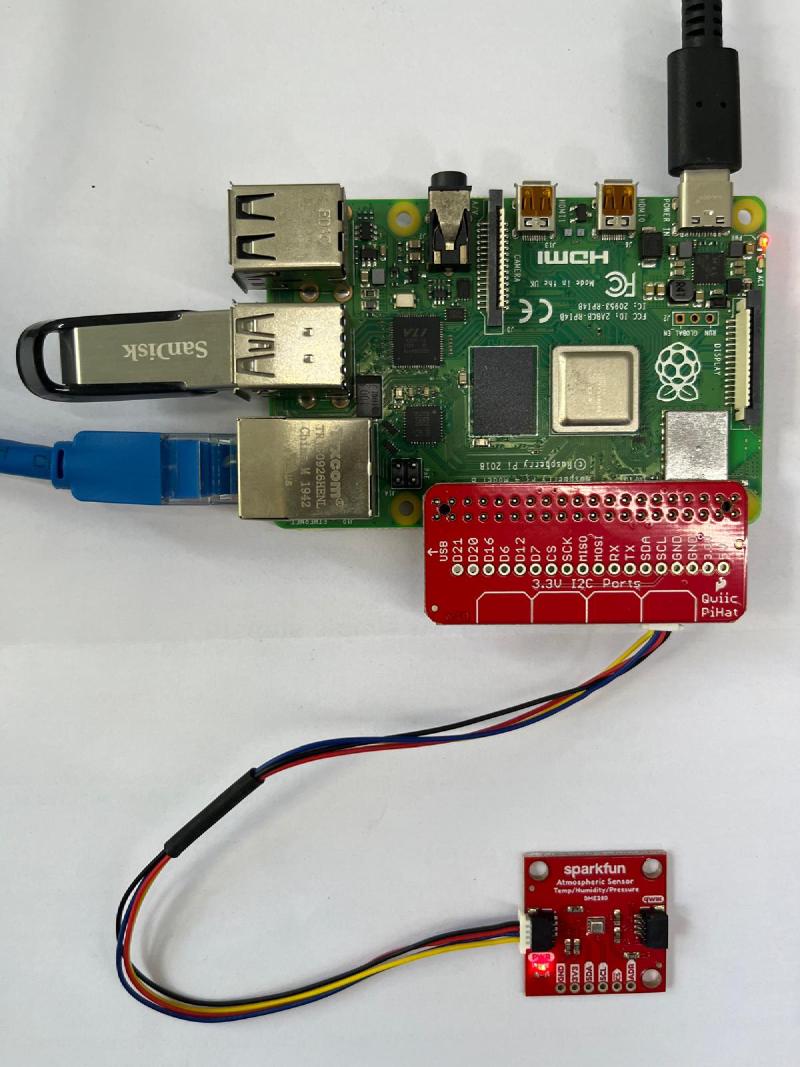
BME280 Breakout    →    Raspberry Pi 4
──────────────          ──────────────
VCC                →    Pin 1  (3.3V)
GND                →    Pin 6  (GND)
SDA                →    Pin 3  (GPIO2 / SDA)
SCL                →    Pin 5  (GPIO3 / SCL)
No pull-up resistors needed — the SparkFun breakout has them built in. After enabling I2C via raspi-config, the sensor shows up at address 0x77:
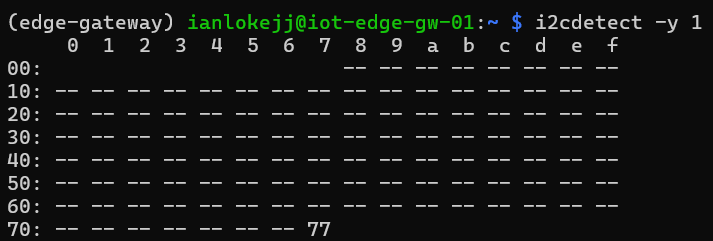
The BME280 reads temperature (±0.5°C accuracy), relative humidity (±3% RH), and barometric pressure — three measurements from a single chip over two wires.
Why Two Protocols? #
This is where most tutorials stop. “Here’s how to read a sensor. Here’s how to publish to MQTT. Done.” But that misses the point entirely.
In any real IT/OT environment, you need two data paths:
flowchart LR
    GW[Edge Gateway]

    GW <-->|"OPC UA
Rich data model
Browse & subscribe"| SCADA[SCADA / HMI]
    GW -->|"MQTT
Lightweight pub/sub
Outbound only"| CLOUD[Cloud / Dashboard]

    style GW fill:#2ecc71,color:#fff
    style SCADA fill:#45b7d1,color:#fff
    style CLOUD fill:#a29bfe,color:#fff
OPC UA is the protocol that OT systems speak. When a SCADA operator opens WinCC Unified and browses for available data points, they’re using OPC UA. It provides a rich, typed, browsable data model — the client can discover what’s available, what the engineering units are, and what the valid range is, all without prior configuration.
MQTT is the protocol that gets data out of the OT network and into IT systems. It’s lightweight (2-byte minimum header), uses outbound-only connections (no inbound firewall ports needed), and scales to millions of devices. A Grafana dashboard, a cloud analytics platform, or an AI/ML pipeline subscribes to the MQTT broker and receives data as it changes.
They are not competing. They are complementary — OPC UA gives data structure and meaning, MQTT moves it efficiently to where it’s needed.
| OPC UA | MQTT | |
|---|---|---|
| Direction | Horizontal (OT ↔ OT) | Vertical (OT → IT) |
| Architecture | Client/Server | Publish/Subscribe via broker |
| Data Model | Rich, typed, browsable address space | None (payload is opaque bytes) |
| Best For | SCADA, HMI, MES on the LAN | Cloud, dashboards, analytics |
| Connection | Bidirectional (server accepts inbound) | Outbound only (client initiates) |
| Overhead | ~100+ byte session handshake | 2-byte minimum header |
| Scale | Hundreds of clients per server | Millions of connections per broker |
The MQTT Path #
MQTT uses a publish/subscribe model. Producers publish messages to topics on a broker. Consumers subscribe to topics they care about. The broker handles routing — producers and consumers never connect to each other directly.
Topic Structure #
Topics in MQTT are hierarchical strings separated by /. For industrial data, the standard practice is to map the topic hierarchy to the ISA-95 model of your business:
{enterprise}/{site}/{area}/{line}/{device}/{category}/{measurement}For this lab:
home/lab/workbench/line-1/iot-edge-gw-01/telemetry/temperature
home/lab/workbench/line-1/iot-edge-gw-01/telemetry/humidity
home/lab/workbench/line-1/iot-edge-gw-01/telemetry/pressure
This isn’t arbitrary naming. It enables powerful wildcard subscriptions:
| Subscriber | Topic Pattern | What They Get |
|---|---|---|
| Line dashboard | home/lab/workbench/line-1/# |
Everything on Line 1 |
| All temperature readings | home/lab/+/+/+/telemetry/temperature |
Temperature from every device |
| Enterprise historian | home/+/+/+/+/telemetry/# |
All telemetry, all sites |
How It Flows #
flowchart LR
    S[BME280] -->|I2C Read| GW[Edge Gateway
Publisher]
    GW -->|PUBLISH| B((Mosquitto
Broker))
    B -->|FORWARD| D[Dashboard
Subscriber]
    B -->|FORWARD| H[Historian
Subscriber]

    style S fill:#4ecdc4,color:#fff
    style GW fill:#f9ca24,color:#333
    style B fill:#2ecc71,color:#fff
    style D fill:#a29bfe,color:#fff
    style H fill:#a29bfe,color:#fff
The sensor publishes to the broker. Any number of subscribers receive the data — a dashboard, a historian, a cloud platform. Producers and consumers never connect to each other directly. The broker decouples them, which means you can add new consumers without touching the publisher.
In production, the MQTT broker would typically be a separate, dedicated system — HiveMQ or EMQX for enterprise scale, or Mosquitto for smaller deployments. In this lab, the Raspberry Pi runs both the publisher and the broker on the same device.

Each message carries a JSON payload with the value and its engineering unit. This is the simplest approach. For larger deployments, Sparkplug B adds standardized data types, device birth/death certificates, and Protobuf encoding — but that’s a topic for another post.
The OPC UA Path #
OPC UA takes a fundamentally different approach. Instead of publishing to topics, the edge gateway runs a server that exposes an address space — a tree of objects and variables that clients can browse, read, and subscribe to.
Address Space Model #
Objects
└── EnvironmentSensors (Folder)
    └── BME280 (Object)
        ├── Temperature: 28.3  (Float)
        ├── Humidity: 65.2     (Float)
        └── Pressure: 1012.4   (Float)
When an OPC UA client connects, it doesn’t need to know the data structure in advance. It can browse the address space, discover what’s available, inspect data types and engineering units, and then subscribe to the variables it cares about. This self-describing capability is what makes OPC UA the standard for machine-to-machine communication on the plant floor.
How It Flows #
sequenceDiagram
    participant C as SCADA Client
    participant S as Edge Gateway
(OPC UA Server)
    participant Sensor as BME280

    C->>S: OpenSecureChannel
    S-->>C: SecureChannelResponse
    C->>S: CreateSession
    S-->>C: SessionResponse
    C->>S: Browse (Objects → EnvironmentSensors → BME280)
    S-->>C: Temperature, Humidity, Pressure

    C->>S: CreateSubscription (1000ms interval)
    C->>S: MonitoredItems (Temperature, Humidity, Pressure)

    loop Every publish interval
        Sensor->>S: I2C Read
        S->>C: Notification (changed values only)
    end
Notice the difference from MQTT: OPC UA requires a 4-step handshake (SecureChannel → Session → Browse → Subscribe) before the first data point arrives. This is why OPC UA is often called “heavier” — but that overhead buys you built-in security, rich data typing, and a self-describing data model that MQTT lacks.
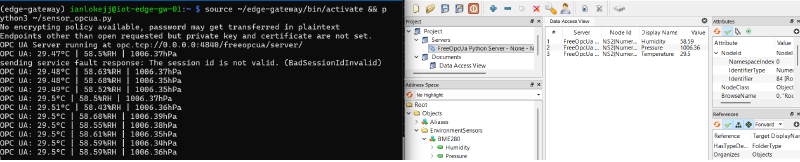
Running Both: The Complete Edge Gateway #
The real power is running both protocols from a single process. One sensor reading serves two worlds — OT systems browse the OPC UA server on the LAN, while IT systems subscribe to MQTT topics from anywhere.

This is exactly what commercial edge gateways do. A Siemens Industrial Edge device reads S7 PLC data via OPC UA and publishes it to an MQTT broker for cloud consumption. A Beckhoff EK9160 does the same with EtherCAT devices. The pattern is always the same:
flowchart LR
    subgraph "What we built"
        A1[BME280] -->|I2C| B1[Raspberry Pi]
        B1 -->|OPC UA| C1[UaExpert]
        B1 -->|MQTT| D1[mosquitto_sub]
    end

    subgraph "What factories deploy"
        A2[S7-1500 PLC] -->|PROFINET| B2[Industrial Edge]
        B2 -->|OPC UA| C2[WinCC Unified]
        B2 -->|MQTT| D2[Cloud Analytics]
    end

    style B1 fill:#2ecc71,color:#fff
    style B2 fill:#2ecc71,color:#fff
The architecture scales. Replace the BME280 with a PLC. Replace Mosquitto with HiveMQ. Replace UaExpert with WinCC Unified. The data flow is the same — only the scale and the price tag change.
Where This Sits in the Purdue Model #
The ISA-95 / Purdue model defines the network hierarchy of an industrial environment. Our Raspberry Pi sits at Level 2 — area supervisory control — acting as the bridge between field devices below and operations/enterprise systems above.
flowchart TB
    L4["Level 4 — Enterprise / Cloud
ERP, Analytics, Dashboards"]
    L3["Level 3 — Site Operations
MES, Historian, SCADA Server"]
    L2["Level 2 — Area Supervisory ← RPi Edge Gateway
MQTT Broker + OPC UA Server"]
    L1["Level 1 — Basic Control
PLCs, Controllers"]
    L0["Level 0 — Physical Process
BME280: Temperature, Humidity, Pressure"]

    L4 --- L3 --- L2 --- L1 --- L0

    style L4 fill:#a29bfe,color:#fff
    style L3 fill:#74b9ff,color:#fff
    style L2 fill:#2ecc71,color:#fff
    style L1 fill:#fdcb6e,color:#333
    style L0 fill:#4ecdc4,color:#fff
In a traditional Purdue architecture, data flows strictly between adjacent levels — Level 0 talks to Level 1, Level 1 to Level 2, and so on. Each hop requires a different protocol translation. Getting a sensor reading from Level 0 to Level 4 means traversing 4 hops and 4 integrations.
The edge gateway pattern — and the emerging Unified Namespace architecture — challenges this by allowing any level to publish and subscribe to a central MQTT broker. But that’s the next post in this series.
Key Takeaways #
-
An edge gateway bridges OT and IT by serving the same data over two protocols — OPC UA for local plant-floor systems, MQTT for cloud and enterprise.
-
MQTT and OPC UA are not competitors — they operate at different layers. MQTT is transport (move data efficiently). OPC UA is semantics (give data meaning).
-
The architecture is scale-independent. A Raspberry Pi with a BME280 implements the same pattern as a Siemens Industrial Edge with an S7-1500 PLC. The difference is reliability, certification, and support — not architecture.
-
Topic structure matters. Mapping MQTT topics to your ISA-95 business hierarchy enables wildcard subscriptions that scale from one sensor to an entire enterprise.
What’s Next #
This Raspberry Pi lab is the foundation for deeper exploration:
- Unified Namespace — restructuring these MQTT topics into a factory-wide single source of truth
- MQTT 3.1.1 vs 5.0 — what the protocol upgrade changes for OT environments
- Securing OT data — TLS, topic ACLs, and where data diodes fit in this architecture
- OPC UA under the hood — why those 4 handshakes matter, captured in Wireshark
The hardware stays the same. The concepts get deeper.